
FTTH Solution
How to Select an FTTH Distribution Box by Port Count, IP Rating and Splice Capacity
A procurement guide to sizing an FTTH distribution box around served premises, splitter layout, splice trays, cable entries, enclosure protection and field-access requirements.
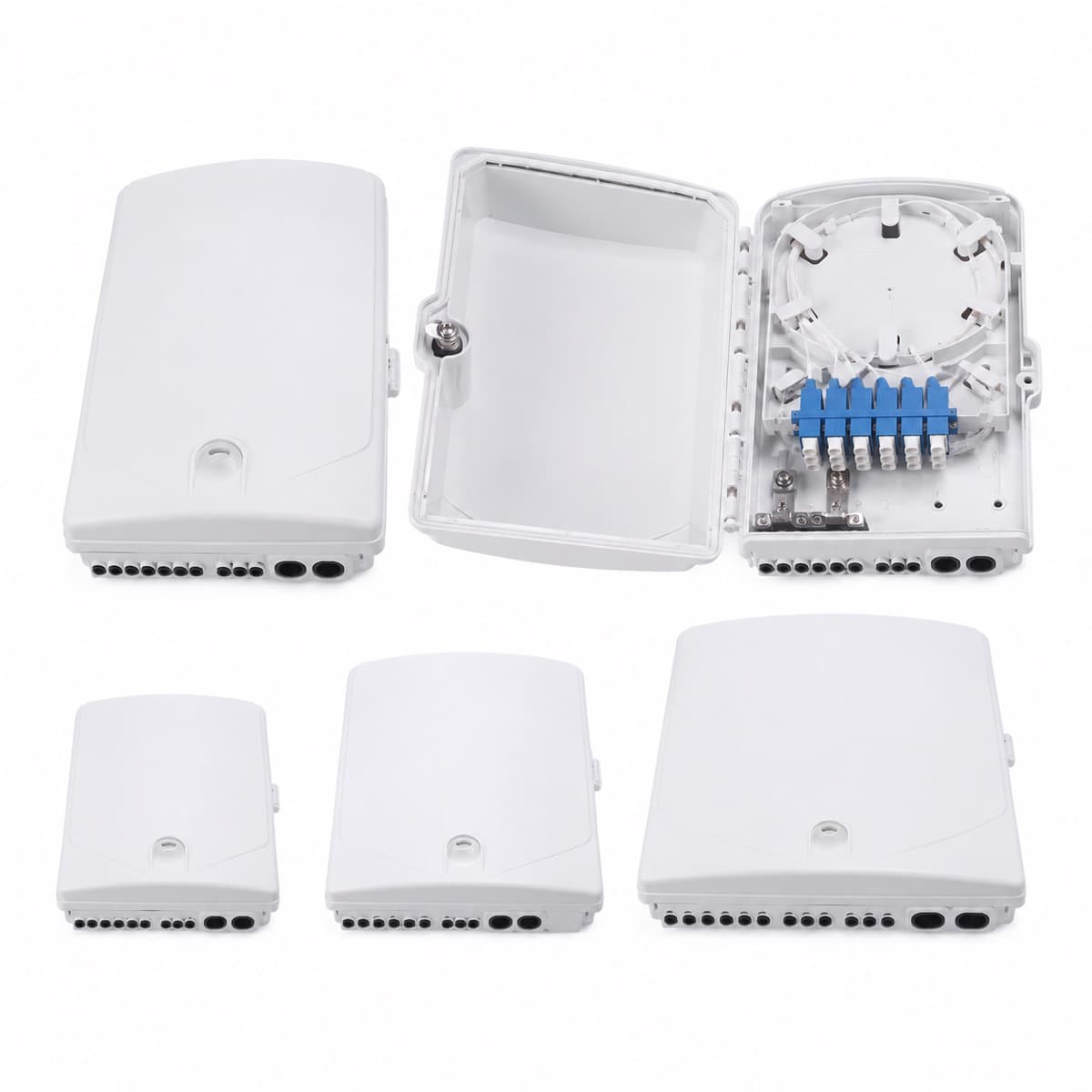
Start with the network node, not the box catalogue
Mark where the enclosure sits in the optical distribution network and what it must do. A façade box serving eight homes, a pole-mounted splitter point and a corridor termination cabinet can all be called FTTH distribution boxes, but their cable entry, sealing, splitter, splice and access needs differ. State indoor or outdoor location, pole or wall mounting, feeder and drop cable types, splitter architecture, number of premises passed and number activated in the first phase.
Separate service ports from total network capacity
An 8-, 16- or 24-port label usually describes subscriber adapter positions, not every fibre, splice or future branch the enclosure can hold. Calculate outputs from the splitter plan, then add the spare-port policy used by the operator. Confirm adapter format, connector polish and whether unused ports have dust caps. If the project expects staged activation, verify that technicians can add drops without disturbing live fibres or opening an unprotected splice area.
Calculate splice capacity from the actual fibre path
Count incoming feeder fibres that will be expressed, spliced or stored; splitter input and output pigtails; distribution fibres; maintenance reserves; and any pass-through fibres. Then check tray quantity, fibres per tray, splice-sleeve holders, bending control and tray access. A box can have enough front ports but insufficient protected space for the planned splices. Ask for an internal photograph or drawing showing tray, splitter and routing arrangement, not only the closed enclosure.
Confirm splitter type and mounting space
State the PLC splitter ratio, package style, connectorization and number of splitters. A bare-fibre, ABS-module, cassette or plug-in splitter occupies different space and changes fibre routing. Confirm whether the box is supplied with the splitter, adapters, pigtails and splice sleeves or only as an empty enclosure. The tender should define optical component requirements separately; an enclosure port count is not evidence of splitter performance.
Use the IP rating in context
IEC 60529 classifies enclosure protection against access, solid foreign objects and water. An IP code is meaningful only for the tested configuration, including seals, cable glands, closures and mounting. Ask for the declared rating and supporting report when contractually required, but also review UV exposure, corrosion, temperature, impact, drainage, insect entry and repeated opening. A high printed IP number does not compensate for an unsuitable cable entry or a seal that installers must cut away.
Match cable entries, glands and bend control
List each incoming and outgoing cable by type, outside diameter, messenger or strength-member arrangement and whether mid-span access is needed. Check gland range, grommets, sealing plugs, strength-member anchoring and the minimum bend path inside the box. Outdoor flat drop cable, round distribution cable and microduct do not use the same entry detail. Ensure the closure can be reopened without damaging seals or forcing tight bends around the splitter.
Plan mounting and technician access
Specify wall, pole, aerial strand or indoor cabinet mounting and identify the hardware included. Check door clearance, hinge direction, lock or security screw, grounding provision for metallic components, labeling space and the ability to work safely in rain or on a pole. For dense subscriber areas, connector access and fibre identification can matter more than reducing enclosure size. Request a dimensional drawing and installation sample before approving a new mould or configuration.
Send a complete box RFQ
Provide service-port count, splitter ratio and package, feeder and drop fibre counts, splice count, adapter and connector type, cable quantities and diameters, indoor or outdoor location, required IP code, UV or corrosion conditions, mounting method, lock, label, colour, logo, accessories, quantity and required test evidence. UKCC Fiber can then confirm an enclosure configuration against the network layout instead of offering a nominal port count that leaves installation details unresolved.
Need help choosing a product?
Send the route, fiber count, quantity and destination country. UKCC Fiber can help match the cable and related FTTH materials.
Request Project Support